Google My Business - Connect with your Customers
Google My Business (GMB) is a powerful tool that can help businesses connect with their customers in a meaningful way. With the growing importance of online presence, GMB has become an essential tool for businesses to get discovered and engage with customers. In this blog post, we will discuss the benefits of using GMB to connect with your customers and how to get the most out of this platform. Claim your Business Profile directly on Search and Maps
It is now easier to complete verification or resolve other issues with your Business Profile. Just search for the name of your business on Google or go to your profile directly in the Google Maps app and you’ll see an option to verify the profile or resolve other issues, like profile suspension. You can also search for ‘my business’ on Google Search to get to your Business Profile.
Manage GMB Profile directly on Google
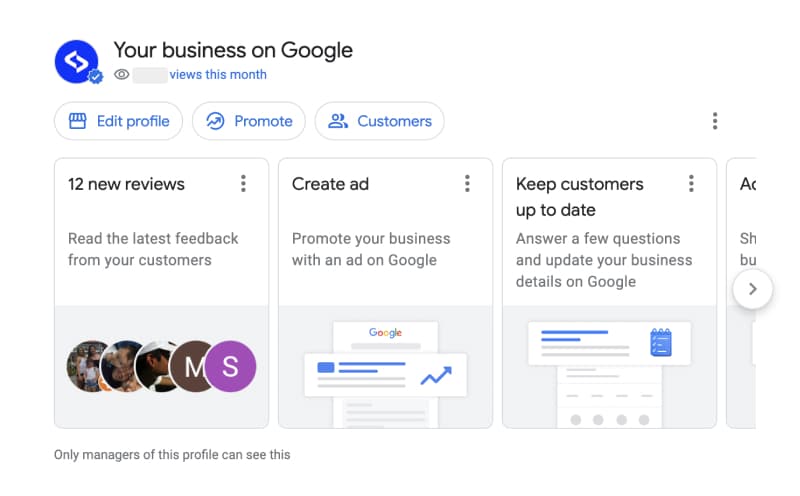
If you log in with your Google account that manages your Google my business profile, you can access the Google My Business account by typing your business name in the Google search results.
You will see this new panel:
It is a summary of all the features that you can interact with regularly right in the local search results. Now it is easier to have these options right at your fingertips.
Here is what you can do actually:
- View the latest reviews and star ratings
- Respond quickly to your Google reviews
- Create Google Ads – faster and much easier
- Create a Google post in a quick popup and promote your special offers
- View Google analytics and insights
- Update your GMB listing, such as business information, phone number, business description, business category, etc.
Google My Business (GMB) has rolled out several new features that can help businesses improve their online presence and connect with customers.
1. Video Posts One of the most exciting new features of GMB is the ability to create video posts. Video is a highly engaging format that can help businesses showcase their products and services in a more dynamic way. With this new feature, businesses can now create short videos and add them to their GMB listing, helping them stand out from the competition and capture the attention of potential customers. 2. Product Catalog GMB has also introduced a new product catalog feature, allowing businesses to showcase their products in a more organized and visually appealing way. With this new feature, businesses can add product descriptions, prices, and images, making it easier for customers to browse and purchase products directly from the GMB listing. 3. Messaging Another exciting new feature of GMB is the ability to communicate with customers directly through the messaging feature. This allows businesses to respond to customer inquiries in real-time, providing a more personalized and convenient experience for customers. With the messaging feature, businesses can also set up automated responses and frequently asked questions, making it easier to manage customer inquiries. 4. Service Areas For businesses that provide services at their customer’s location, GMB has introduced a new service area feature. This allows businesses to specify the areas they serve, making it easier for potential customers to find and connect with the business. This feature is particularly useful for businesses such as home services, where location is a critical factor for customers.
Google My Business Messaging on Desktop
When messaging is enabled, customers will see a “Chat” button on their Google Maps Business Profile and will be able to message you at any time.In conclusion, Google My Business is an essential tool for businesses to connect with their customers. By creating a GMB listing and providing detailed information, responding to reviews, posting updates, and using insights to make informed decisions, businesses can build a strong online presence and establish a meaningful relationship with their customers.